This second part of the series is really to compliment the first part I wrote. Some may not know or most of you already know, this was some notes that was taken way back in the SQL 2005 days. But it is a simple and nice overview to understand a SQL query better, and it really explains why the SQL performance is always pointing back to:
1) Processor
2) Memory
3) Disk
Although the process may differ from product to product, but this is very general overview. Usually at the 2nd phase of the query it will check for syntax, look out for the resources available and set a "cost" for the query before it really process the query.
When the processing take place it will really take a performance toll unto the server memory, disk and CPU that is why we whenever we need to setup any SQL server, we need to really take into consideration of the above three components first, and subsequently to look into the SQL statement to enjoy better performance.
Happy reading! :)
SY
This wasn't an easy decision, back there it was purely SCCM. Now, I have decided to focus on Endpoint Technology instead. I hope to spend more time blogging various technologies and how they can blend in together. ~ SY
Showing posts with label MS SQL. Show all posts
Monday, 16 November 2015
Sunday, 1 November 2015
SQL Setup For SCCM 2012 (Part 1)
I am not a DB expert but I did went through great length to do a lot of research for DB setup for SCCM 2012, this is including some of the previous MS chalk talks I have attended plus of course some of the tips and tricks from various MVPs and here is the platform for me to share my findings.
A lot of time this may not sound like SCCM to you, but trust me SCCM performance issue is closely knitted with the performance of its own database that is why I thought I spend a lot more time on this topic which is seldom shared.
Why am I writing this? Because chances are, you be like me who will be handling several systems in the company and you have little time for SCCM. Therefore you really want SCCM DB to be designed nicely to give you lesser headache.
I tried to generalise the concepts shared here so that you could use the concepts here for typical SQL server as well. But for MS products every product has specific requirement of the SQL settings. So it will be best to consult MS technet or consultants on this matter.
Before I end part 1. Here are the typical three areas professionals look at, when they deal with SQL performance. While network should not be overlooked as well however I am giving network a miss because seldom the performance related issue with SQL server is due to network.
A lot of time this may not sound like SCCM to you, but trust me SCCM performance issue is closely knitted with the performance of its own database that is why I thought I spend a lot more time on this topic which is seldom shared.
Why am I writing this? Because chances are, you be like me who will be handling several systems in the company and you have little time for SCCM. Therefore you really want SCCM DB to be designed nicely to give you lesser headache.
I tried to generalise the concepts shared here so that you could use the concepts here for typical SQL server as well. But for MS products every product has specific requirement of the SQL settings. So it will be best to consult MS technet or consultants on this matter.
Before I end part 1. Here are the typical three areas professionals look at, when they deal with SQL performance. While network should not be overlooked as well however I am giving network a miss because seldom the performance related issue with SQL server is due to network.
The above areas are not in any order.
Happy reading! :)
SY
Friday, 19 June 2015
SCCM 2012 R2 Collection Design
This post was actually inspired by this thread how often do we actually think of designing a series of collection to help us to group the devices functionally and at the same time not sacrificing the SQL performance?
I have spend a lot of time gathering information and to my pleasant surprise it is a very big subject by itself, from Collection to the performance of SQL is closely knitted.
First what is collection?
From technet:
"Provide you with the means to organize resources into manageable units, which then enable you to create an organized structure that logically represents the kinds of tasks that you want to perform. "
Second, after we learn how the collection is related to SQL, in order to take care of the performance, the collection should refrain from complex queries as it will with temporary stored procedures, table variables or cursors. This is especially more true if your collection is too complex: https://msdn.microsoft.com/en-us/library/ms190768.aspx
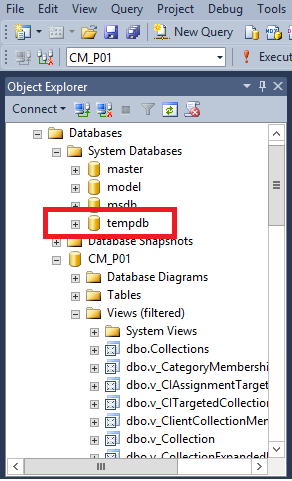
Third, since tempdb is important and we cannot ignore this, you really want to setup your SCCM server or any other related products that uses MS SQL with at least four databases. From this KB:
https://support.microsoft.com/en-us/kb/2154845
Initial setup of 4 tempdb will be a good start off point. And because of heavy I/O involved it will be a good idea to place the tempdb in a separate hard disk, if you cannot afford to do that, monitor the size of tempdb and manage from there, give the initial size of the tempdb last than half of the CM database size.
Assuming the CM database is 100GB,
40GB (40% of 100GB) / 4 tempdb = 10GB each.
A nice article on tempdb initial sizing: http://logicalread.solarwinds.com/sql-server-tempdb-best-practices-initial-sizing-w01/#.VYQzIPmqpBc
My personal preference is to let the tempdb to grow in MB instead of percentage. To grow in MB helps you to capped it at a controlled fashion. To grow by 10% of 20GB is equal to 2GB vs To grow by 500MB at a time.
Fourth, how can we build a better collection query then? A general rule of thumb, a good collection query should avoid:
I hope this article have help you to understand your SCCM collection better. :)
SY
I have spend a lot of time gathering information and to my pleasant surprise it is a very big subject by itself, from Collection to the performance of SQL is closely knitted.
First what is collection?
From technet:
"Provide you with the means to organize resources into manageable units, which then enable you to create an organized structure that logically represents the kinds of tasks that you want to perform. "
![]() |
| So how is collection closely related to SQL? Collection creation is done using WQL, WQL is a subset of SQL and is mainly used in SMS provider to view device WMI details. |
![]() |
| In SQL, you are unable to execute WQL, all the WQL queries are kept in: Collection_Rules_SQL views, in here you can see that the WQL statements in the collection is converted into SQL statement. |
Second, after we learn how the collection is related to SQL, in order to take care of the performance, the collection should refrain from complex queries as it will with temporary stored procedures, table variables or cursors. This is especially more true if your collection is too complex: https://msdn.microsoft.com/en-us/library/ms190768.aspx
Third, since tempdb is important and we cannot ignore this, you really want to setup your SCCM server or any other related products that uses MS SQL with at least four databases. From this KB:
https://support.microsoft.com/en-us/kb/2154845
Initial setup of 4 tempdb will be a good start off point. And because of heavy I/O involved it will be a good idea to place the tempdb in a separate hard disk, if you cannot afford to do that, monitor the size of tempdb and manage from there, give the initial size of the tempdb last than half of the CM database size.
Assuming the CM database is 100GB,
40GB (40% of 100GB) / 4 tempdb = 10GB each.
A nice article on tempdb initial sizing: http://logicalread.solarwinds.com/sql-server-tempdb-best-practices-initial-sizing-w01/#.VYQzIPmqpBc
My personal preference is to let the tempdb to grow in MB instead of percentage. To grow in MB helps you to capped it at a controlled fashion. To grow by 10% of 20GB is equal to 2GB vs To grow by 500MB at a time.
Fourth, how can we build a better collection query then? A general rule of thumb, a good collection query should avoid:
- Using too much joints
- Refrain from using too
much "where" clauses
- Refrain from using "Like" and "Not Like" statements as it is consider a "expensive" in terms of SQL performance. As it causes table scans. https://msdn.microsoft.com/en-in/library/ff647793.aspx
Finally, considering all the above, you should consider the design of the Collection,
although there no hard and fast rule in the design, a good collection
design will not impact the SQL performance and to start off with a good
design you should consider:
- Collection naming convention should be direct and easy
to understand. You could either create the collection base on department
basis or by application basis.
- Refrain yourself using limiting collection especially
the root collection "All System" This will actually cause all
other collections that is limited to "All System" to be
evaluated. This is will in turn have an adverse impact on the SQL
performance. http://www.amazon.com/Kent-Agerlund/e/B008A01KS8
- Do not use incremental updates, because you will suffer from a cumulative performance issue from David's Blog http://www.david-obrien.net/2014/05/configmgr-collection-updates/ if a lot collections have incremental updates turned on. MS recommend you have not more than 200 collections turned on for incremental updates. https://technet.microsoft.com/en-us/library/gg699372.aspx
And thank you to Senthil's blog as well to help me understand better:
I hope this article have help you to understand your SCCM collection better. :)
SY
Subscribe to:
Posts (Atom)